Designing High-Conversion Fashion Sale Social Media Graphics
If you have ever stared at a blank canvas in Photoshop while a flash sale is scheduled to go live in an hour, you know the specific kind of panic that sets in. Creating a sense of urgency and style simultaneously is the hardest part of digital marketing, especially in the fashion industry where aesthetics are everything. A successful Fashion Sale Social Media campaign relies heavily on visual hierarchy. You need the discount percentage to pop, the product to look desirable, and the brand voice to remain consistent. This is where having a structured, professional approach to your design assets changes the game. Instead of reinventing the wheel every time a sale comes around, smart designers and business owners rely on pre-structured templates to streamline their workflow and maintain that polished, high-end look that customers expect.
The Anatomy of an Effective Sales Banner
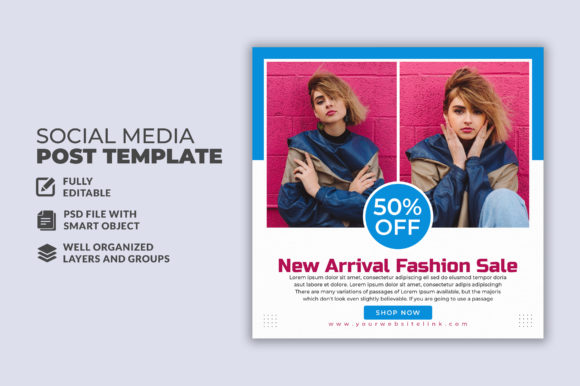
When we talk about social media post templates, specifically for fashion, we are dealing with a unique set of constraints. The 1080x1080 pixel dimension has become the gold standard for Instagram feeds and Facebook ads, but it is a tight space to work with. You have to balance negative space with bold typography. A template designed for this specific niche acts as a blueprint. It guides the eye. For instance, a well-organized PSD file allows you to separate the background imagery from the overlay text. This separation is crucial for readability. If your "50% OFF" text blends into the model's clothing, the message is lost, and the conversion rate drops.
The visual appeal of these templates often lies in their modern typography and layout structure. Fashion is cyclical, but clean lines and bold contrasts are timeless in graphic design. A good template utilizes layers effectively, allowing you to swap out a summer dress for a winter coat without breaking the layout. The goal is to create a visual hook that stops the scroll. This involves understanding how different elements interact—the sharpness of a sans-serif font against a soft, blurred background image creates a dynamic tension that draws the viewer in.
Practical Applications Beyond the Instagram Feed
While the primary use case for a Fashion Sale Social Media asset is obviously the feed, a versatile template offers much more value. Think about the breadth of content you need to produce for a single campaign. You aren't just posting once; you are storytelling across multiple touchpoints.
- Instagram Stories and Reels: While the square format is standard, a good layered file allows you to adapt elements for vertical viewing. You can take the typography styles and color codes from the square template to create consistent Story highlights.
- Website Banners: Your social media aesthetic should match your homepage. If you are running a "Summer Blowout" on Instagram, your website hero image needs to reflect that same energy. Using the same design assets ensures brand identity consistency.
- Email Marketing Headers: Email open rates rely on subject lines, but click-through rates rely on the visual inside. Repurposing your social media banner design for the email header creates a cohesive user experience from the inbox to the checkout page.
- Print Materials: Don't forget the physical world. If you have a brick-and-mortar store, you can extract elements from your digital template to create in-store signage, lookbooks, or flyers. The scalability of vector smart objects within these PSD files ensures your graphics remain crisp even when printed on large posters.
Customization: Making the Template Your Own
The biggest risk with using a social media post template is looking generic. If every fashion brand used the exact same layout, the feed would become monotonous. The key is customization. A professional template is not a finished product; it is a starting point. Because these files are 100% layered and fully editable, you have the freedom to inject your specific brand personality into the design.
Start with the typography. If the template comes with a free font, look at its personality. Is it a bold, modern display font suitable for streetwear? Or is it an elegant serif font better suited for luxury evening wear? If the included typeface doesn't match your vibe, swap it out. The "All Text Editable With Text Tool" feature is vital here. You should be testing different font pairings. Try combining a heavy, all-caps headline font with a delicate, light-weight sub-header to create visual interest. This contrast helps organize information, distinguishing the "What" (The Sale) from the "How Much" (The Discount).
Color grading is another powerful customization tool. Fashion is seasonal. Your winter sale shouldn't look like your summer clearance. Use the layered structure to add adjustment layers over the placeholder images. Warm up the tones for autumn collections or cool them down for winter blues. This subtle shift in color psychology can significantly impact audience engagement.
Streamlining Workflow for Entrepreneurs and Creators
For the small business owner or the solo content creator, time is a non-renewable resource. You might be managing inventory, shipping, customer service, and trying to squeeze in marketing. A well-organized PSD file is a lifesaver in this context. "Well Organized & Easy to edit" means that the layers are named logically—Background, Overlay, Text_H1, CTA_Button, etc. This structure allows you to navigate the file quickly, even if you aren't a Photoshop expert.
Imagine you are launching a 24-hour flash sale. Speed is essential. Instead of designing from scratch, you open your template, drag in your product photo, change the text to "Midnight Madness," adjust the colors to match your brand palette, and export. The entire process takes minutes rather than hours. This efficiency allows you to be reactive. If you see a trend emerging on TikTok or Pinterest, you can quickly adapt your marketing assets to ride that wave before it passes.
Furthermore, using consistent templates helps in A/B testing. To truly understand what drives sales, you need to control variables. By keeping the layout constant but changing the copy or the main image, you can gather data on what your audience actually prefers. This data-driven approach to digital marketing removes the guesswork and leads to higher ROI on your ad spend.
Technical Considerations for Professional Results
There is a technical side to design that often gets overlooked in the excitement of creativity. When working with Photoshop layered PSD files, understanding the build of the file is important. High-quality templates utilize Smart Objects for images. This means you can place a high-resolution photo into the designated area, and the template automatically scales and crops it to fit the mask. This preserves the original image quality, which is critical for web design and high-DPI displays.
Licensing is another critical factor, particularly for commercial use. If you are designing assets for a client or selling merchandise, you must ensure you have the rights to use the fonts included. The note "Free Font Use" is a relief for many designers, as it removes the legal ambiguity often associated with premium fonts. However, always double-check the specific license for the font provided. Can you use it on a t-shirt? Can you use it in a logo? Knowing these boundaries protects your business legally.
Finally, consider the file size and performance. While a 1080x1080 high-quality image is necessary for social media, it needs to be optimized for fast loading times on mobile networks. A good workflow involves editing the high-res file and then using "Save for Web" or similar export settings to balance quality with file size. This ensures your social media graphics look sharp but don't lag the user's feed. By mastering these technical details, you elevate your work from amateur hobbyist to professional designer, creating assets that not only look good but perform well in the real world.